

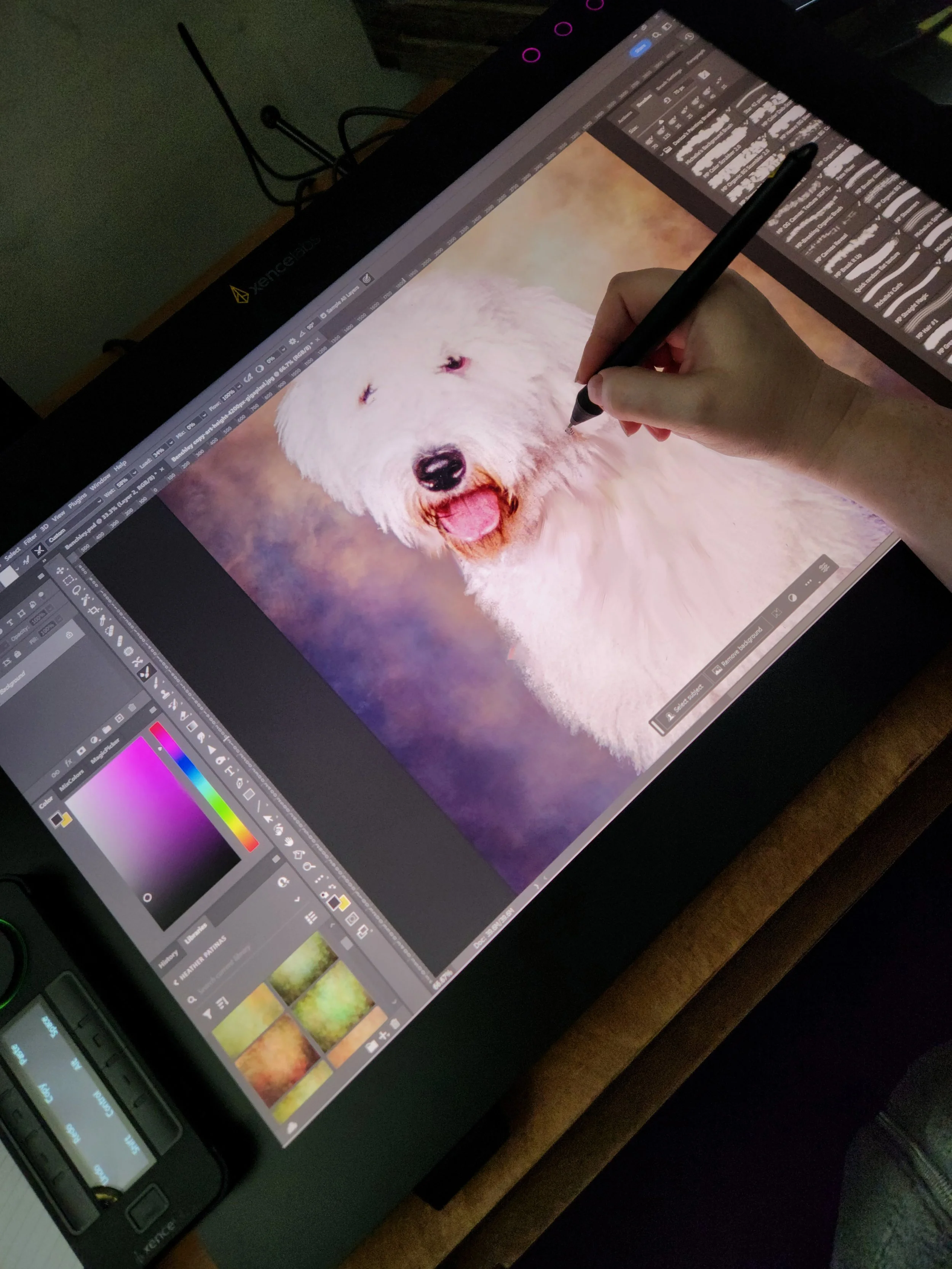

Xencelabs has become a leading name in the digital art space, competing with the more familiar Wacom and Huion brands. Their new 24” pen display tablet is definitely going to be a favorite. I was daunted when I pulled the solidly built pen display tablet out of the box. It’s a substantial 15.2lbs, 24.4 inches wide, and 15.3 inches high. The included stand tilts from 16 to 72 degrees and at 16 degrees, it takes up half of my very large desk. That said, the massive etched glass surface is a dream to draw on.
What’s included in the box:
· One 24” display with 4K UHD resolution and tilt stand
· Two thin and thick 5080 lpi pens, a custom case, and two types of nibs
· One Quick Keys remote with a 3.12 OLED display, a precision dial, and 40 programmable short-cuts
· Three clips to attach the pens and Quick Key to the display
· One drawing glove and cleaning cloth
· A multitude of cables to fit any system configuration imaginable
Set-up is a breeze – download the Xencelabs drivers, plug in the cables, power on the display, and reboot your computer. When it comes back up, your display tablet is ready to go. The driver software is packed with features and allows for customization of the display, Quick Keys, and the pens. I was easily able to color calibrate and adjust brightness and contrast as well as program the Quick Keys with my favorite shortcuts.
My first challenge (after finding room on my desk) was being able to use the pen with multiple displays. Thankfully, Xencelabs offers a “switch display”. Pushing a button will bring up all the displays attached to your system (up to 3), and you can navigate around any of your monitors without having to leave the Xencelabs display or switch to a different input method.
Both pens (thin and thick) have 8192 levels of pen pressure and 60 degrees of tilt sensitivity. Unfortunately, they don’t support pen rotation. Nor are they currently compatible with the existing Xencelabs pen tablets, but I was assured that that would be rectified soon. Since the pens are EMR charged, no batteries are required.
The fully customizable and wireless Quick Keys remote is a favorite and I waxed poetic about it in the previous Xencelabs Pen Tablet Medium Review (PP Magazine – September 2021). The raised dial makes it easy to adjust brush size or zoom and rotate my canvas. It takes a few minutes to get it set up and customized but once done, it can significantly speed up your workflow. The included pressure clip means you can attach it anywhere around the edge of the display’s bezel. It can hold a charge for a day or more which means you don’t even need to plug it in during use. I found that very useful when I had the Quick Keys sitting on my desk or keyboard tray.
The display itself is 4K UHD (3840x2160) which allows for lots of zooming in without a loss of clarity. It’s very vibrant with a 99% RGB color gamut and a bright 330cd/m2 screen and is even Pantone Color Certified. The 16:9 ratio screen active area is a generous 20.7 x 11.7 inches. The three display buttons have all the fun color-changing options for the LED lights that I expect from Xencelabs and are flush with the screen for a sleek look. The built-in tilt stand with rubber feet is very easy to use – a quick squeeze of the clip at the top releases it to move freely to a different angle. I frequently changed angles and, while the display’s weight didn’t make that effortless, it was a simple one-handed operation. It has a VESA mount if you’d prefer to attach it to a flexible arm instead.
I used one of the included felt tips and the resistance from the etched glass surface was perfect, providing a very enjoyable drawing experience, with no squeaking or skipping. It’s fanless and therefore completely silent. The surface is exceptionally glare-free and, even without using the included glove, smudge-free. Even after a week of use, I barely had anything to clean off and I had no issues with overhead lights or sunlight causing annoying reflections. The pen was incredibly sensitive and precise with a great pen to screen accuracy. The heat-dissipating housing kept the surface cool and while I initially thought the bezel was too wide, it allows you to continue your brush strokes off the edge of the screen for very natural strokes as well as providing you with space to grip the edge or rest your hand. The screen and casing are all one build so there’s no physical edge between the two to catch your hand or arm.
The Xencelabs pen display’s etched glass surface was a true pleasure to work on and I can honestly say it was one of the best drawing experiences I’ve ever had. If you’re looking for a professional grade pen display tablet and have the work surface to spare, this is the perfect tool for you.
The Xencelabs Pen Display 24 currently retails for $1,899 at xencelabs.com and is shipping now.