

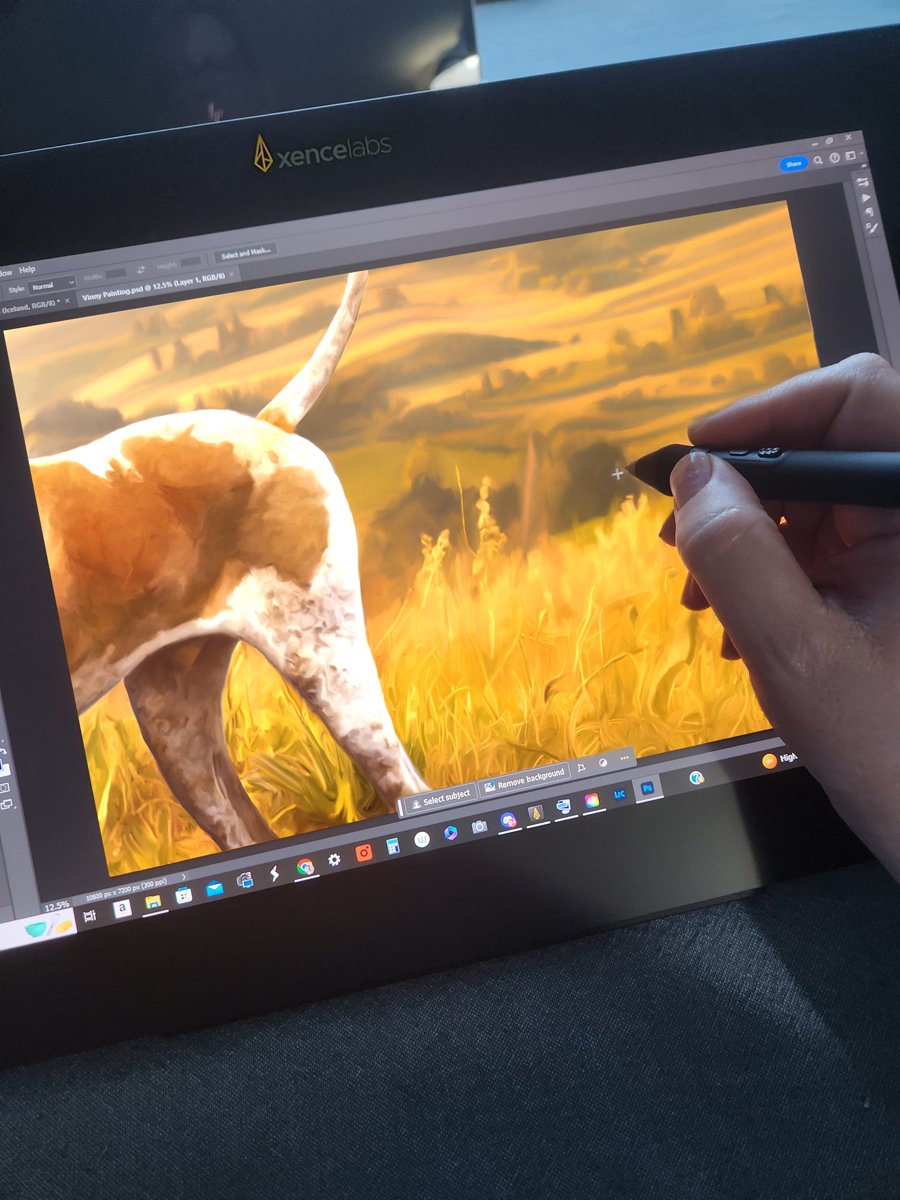
I was offered the opportunity to review the new Xencelabs 16” 4K OLED display tablet bundle and I jumped at it after falling in love with their larger 24” display tablet. The 24” is a beautiful but large and heavy device and I was hoping the 16” would offer a more mobile option for working in other locations.
When the box arrived, I was a little concerned due to its weight but once I opened it up, I discovered it was packed with anything you could possibly need: the pen display, a padded carry bag big enough for both the display and a small laptop, their trademark option of TWO styluses with different barrel widths, spare nibs, Wi-Fi dongle, plugs for every global regions, a hub driver and six cable options, a protective glove, a metal stand, and a Quick Keys remote. I set it up with my laptop and once everything was connected, set the laptop off to the side and worked entirely on the display tablet to complete a large painting in the comfort of my living room.
At under three pounds and less that ½” thick, it rests comfortably in your lap or on the Xencelabs Mobile Easel with dual angles – 18.3 and 32 degrees. With no fan and an aluminum housing, it remains cool even after hours of work. I am very pleased with how lightweight the unit is while still feeling very durable. This is a sleek, minimalist option for travel or just working on the sofa.
The lightweight OLED display’s edge-to-edge seamless smooth surface and glare reduction is bright with virtually non-existent latency. What sets OLED technology apart is its ability to produce deep blacks and vibrant colors, and Xencelabs leverages this to the fullest. With 4K resolution (3840 x 2160) and a high color gamut coverage (98% Adobe RGB, 98% P3-D65, 99% sRGB, 99% REC 709, 82% REC 2020), you get both color and pen accuracy to satisfy the needs of photographers and digital artists who require precise color representation.
The large bezel provides a comfortable resting space for my hand to enable natural drawing movements as well as giving me access to the menus without having to remove my hands. Xencelabs keeps the bezel clear of anything, including buttons. To take advantage of button and dial functionality, users should order the bundle which includes Xencelabs “Quick Keys Controller”, a highly customizable dongle.
The Quick Keys Controller features eight customizable buttons that can be assigned and arranged into sets of up to 40 shortcuts, commands, and options per application. There's support for a wide range of software partners, including Adobe, Corel, and many more. A dial on the Quick Keys Controller adds more customization and that dial allows you to switch between saved configurations based on the software you’re using.
The two pen styluses both offer 8192 levels of sensitivity and 60 degrees of tilt in any direction – the thin pen perhaps caters to those more comfortable with an apple pencil and the fatter one resembles Wacom’s Pro pen. You can set each pen up with different actions on the pen buttons, making it ideal for artists who work in a mix of apps and disciplines.
While the included multitude of cables provide plenty of options, the simple USB-C to USB-C single cable connection with provided 15w power is ideal, although it limits screen brightness to 170cd/m2. If you need additional brightness, the hub provides more powerful alternative connections for up to 300cd/m2. Connection and setup is easy and a large sheet of clearly written instructions makes it quick work. A QR code connects to the driver for download (PC/Mac/Linux – no ChromeOS or Android options).
The pen display features the “Virtual Tablet” which allows users to navigate all attached displays without having to leave the Xencelabs display or switch to a different input method.
Xencelabs is offering the Pen Display 16 Bundle for $1,249 MSRP USD and the Pen Display Essentials for $999 MSRP USD. The Essentials version of the 16” Xencelabs pen display does not include the metal easel, the Quick Keys remote, the charging adapter, or hub with multiple cables. The Quick Keys Controller is available separately for $99.99. Xencelabs has a desktop easel in the works that will include a VESA mount.
While neither of these options are inexpensive, you get great value for money. If you love the idea of having a dedicated pen display that delivers, this is the best option out there. You'll save a little money with even the Pen Display 16 Bundle compared to the Wacom, and you'll have a better pen display.
Known for their precision and quality, Xencelabs has once again delivered a product that stands out in a crowded market.